
Excuses
The Excuses feature allows members to submit absence requests directly in Discord. Each excuse record stores the start and end dates along with both an in-character (IC) and an out-of-character (OOC) reason.
Requirements
- The Excuses feature must be enabled for your team (via
/setupor the Dashboard). - You must be an added team member (added by an admin via
/member add). - You must have a folder assigned. Folders are created automatically when a member is added if a forum channel is configured.
Submitting an Excuse
Use the /excuse slash command to open the excuse modal. You will be prompted to fill in four fields:
| Field | Format | Example |
|---|---|---|
| Start Date | D. M. YYYY | 1. 7. 2025 |
| End Date | D. M. YYYY | 5. 7. 2025 |
| IC Reason | Free text | On a mission out of the city |
| OOC Reason | Free text | Going on vacation |
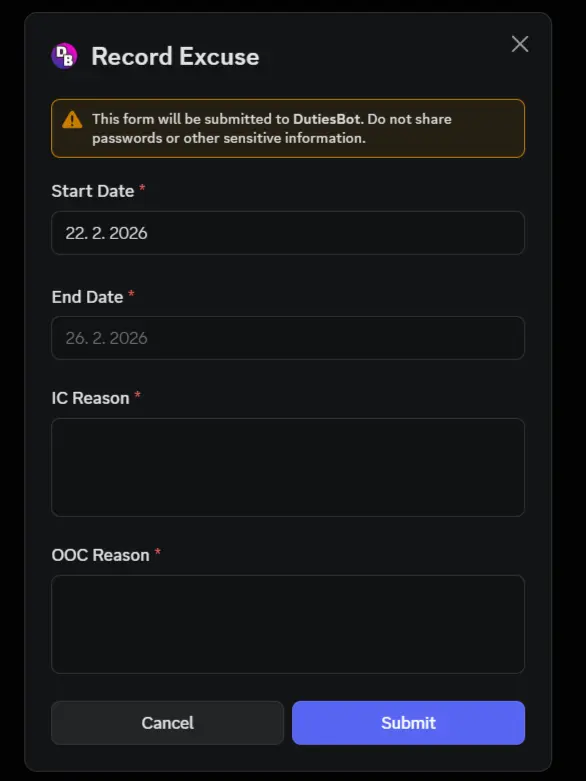
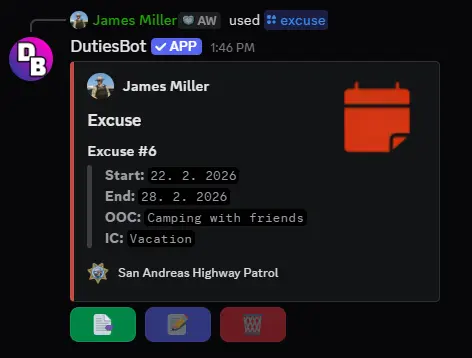
After submitting, the bot posts an excuse embed to your folder channel. If you run /excuse from inside your folder, the embed is posted publicly; otherwise it is sent to your folder and you receive a private confirmation link.
Excuse Embed
The excuse embed includes:
- Your display name and avatar
- Excuse number (e.g.
Excuse #2) - Start date, end date, OOC reason, and IC reason
- Action buttons:
- 📑 Summary — view your overall duty and excuse statistics
- 📝 Edit (coming soon)
- 🗑️ Delete (coming soon)
Input Validation
The bot validates that both the start and end dates follow the D. M. YYYY format (dots and spaces). If the format is incorrect, an ephemeral error message is shown with the values you entered.
Last update: 22. 2. 2026
Duties
Learn how DutiesBot's Duties feature works — members log shifts via Discord slash commands with date, start time, and end time, automatically recorded to their folder.
Members Table
Manage your team roster with DutiesBot's Members Table — add, edit, promote, or remove members using the /member command, with support for custom details and ranks.